| TRAINING SEMINARS
On-Site training seminars are available for your company. In theses times it is more important than ever for your employes to have the knowledge to perform there tasks efficiently. My 30 + years finance experience coupled with my 25+ years experience with spreadsheets can bring that efficiency to you. In house Seminars can be designed to meet your departments needs. Some of the Seminars I have been involved with in the past were:
Working with Excel 2007
There has been great consternation with the change in Excel's interface. Many people and companies have put off upgrading because of the difficulty of transition. This is an overview of Excel 2007 designed to make your transition easier and less stressful. 
 How do the Ribbons Work? How do the Ribbons Work?
Where are my favorite commands?
Some seldom used commands
Popup Ribbons (Hidden functionality)
What can you modify in the interface?
Pivot Tables
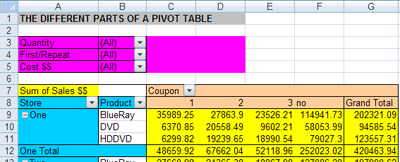
Pivot Tables have always been difficult for people to use. Their ability to take large amounts of data and summarize them in easy to understand formats makes them a valuable le technique. The data can be from an Excel worksheet or drawn directly from external data sources. Once the data is summarized you can build Pivot Charts that are dynamic. This feature has been vastly improved in Excel 2007.
 Use Pivot Tables to work with data files
Understanding the parts of a Pivot Table
The many ways to redisplay your data
How to format your Pivot Table data
Solve traps of Pivot Tables
Use the higher level Pivot Table functions
Various useful Lookup's including
TRUE / FALSE condition in Lookup's
Two way Lookup's
Two column Lookup's
Match & Index functions as Lookup functions
Offset Function with Lookup's
ISERROR & ISNA functions with Lookup's
Macros and VBA:
Record Excel Macros
Use Relative and Absolute addresses
Setup automatic formatting
Build a personal Macro library
Take the next step and modify your macros
Use the Visual Basic Editor
Build a VBA procedure from scratch
Graphs and Charts:
Create a basic pie, line and column/bar chart
Understand chart components
Manipulate data series supporting chart
Create line charts with multiple axis
Customize graphic elements of a chart
Add pictures as background or chart element
IF Commands, Conditional SUMS, and Formatting
Formatting
Two types of Conditional Formatting
True / False Statement in Formatting
Formatting of non-numeric expressions
Format a grid and highlight both duplicates and/or non-duplicates
Set up a "checkerboard" pattern in an Excel file plus other colorful and interesting patterns.
Also Format alternative coloring rows in your Excel files
Highlight positive and/or negative change in two columns
Many other interesting & Useful Formatting tips / tricks
Conditional Sums
Conditional Sum Function
Conditional Sum prompt screen and how to construct Conditional Sums for ?scratch?
Learn when best to use conditional sum Functions and when best to use Pivot Table Functions
IF Commands
Simple Commands
Complex (Bundled) Commands
Conditional Commands
My experience in Finance and Excel could be at your disposal
Contact Me to start your program: Larry Moseley
|